
Make templates “invisible” 🪄

There is another new function that we don’t want to withhold from you:
Making templates invisible for training
There is a new function that makes it easier for you to manage templates. This also makes it easier to select templates in the training facility.
But first things first.
The generation of templates is widely used by our customers. However, this has often caused confusion in the training system, as there were many templates to choose from, some of which were only used for archiving and backup.
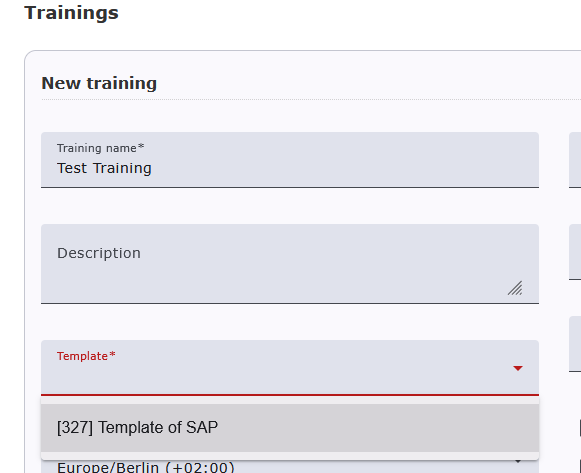
You can now make a template for the training facility “invisible” . This template will then no longer appear in the training setup mask.
Using the tool symbol in the templates mask, you can now not only change the name of the template as before, but also make it invisible and visible again for the training system.
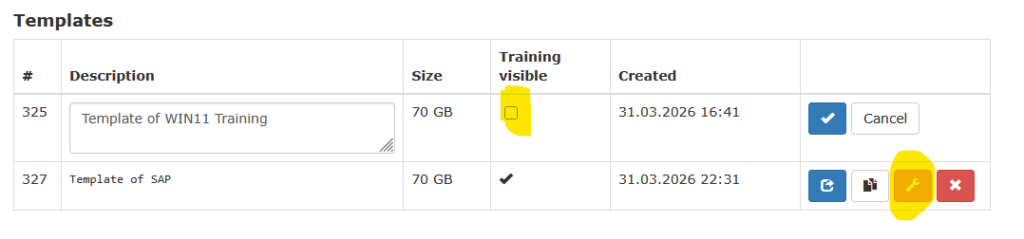
When creating courses, the “invisible” template is no longer available (only the visible template).
However, the template can still be played back into the Master_Desktop. This function has no effect on training courses that have already been created with this template. This means that the training already created runs even if the template is subsequently deactivated.
If you have any questions or comments, please feel free to email us at support@deskmate.cloud.